


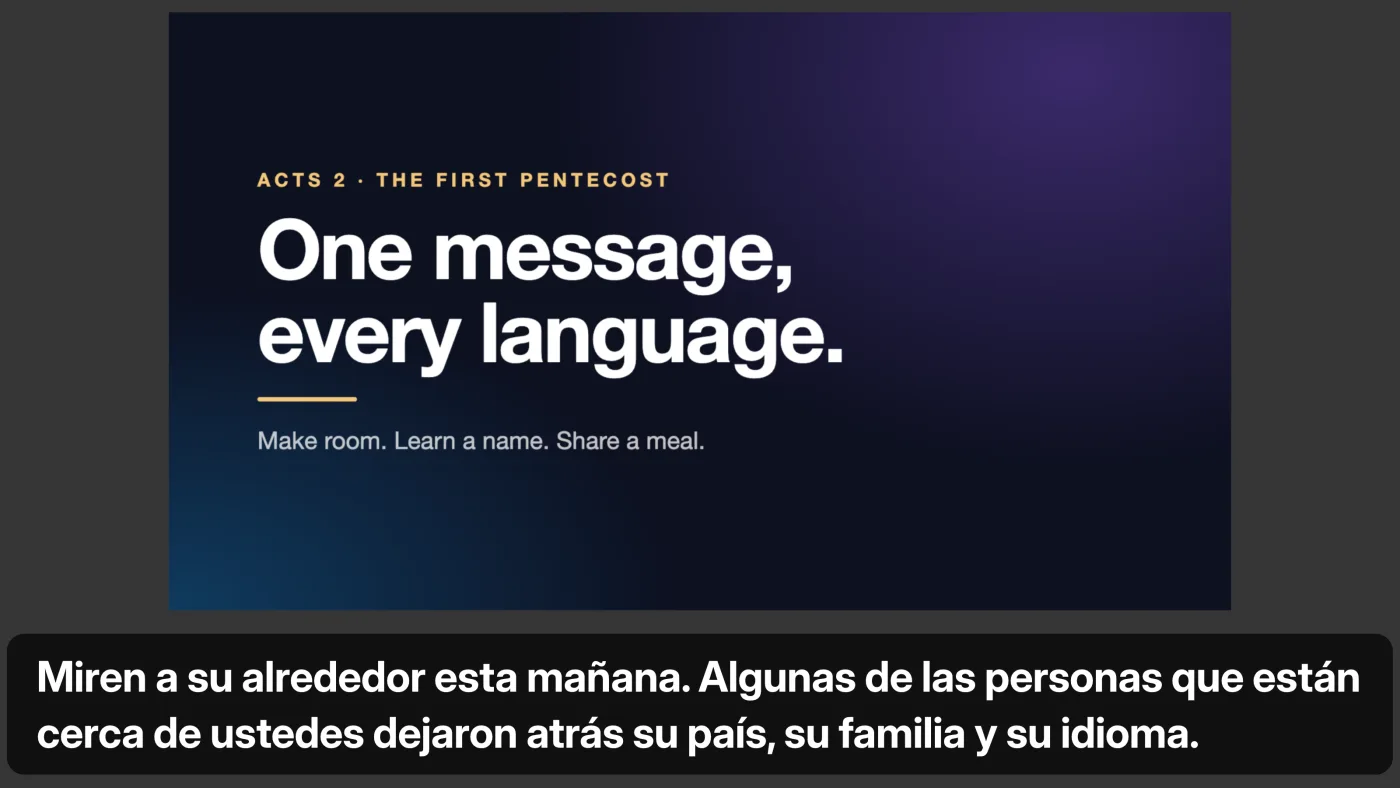
Slides with the translation
Add the pastor’s PDF or pictures and click through them with a clicker or the arrow keys. The translation sits beside the slide or over it, on every screen.
Captions on your screens and a translated voice on every phone. No app, no receivers.
From churches using it
“More than a technological achievement, this program is a bridge between two languages and two generations. Two languages, but one faith. Two generations, but one spiritual family. In church, it is not enough just to be together. It is important that we also understand one another.”
 Pastor Daniel Brânzei
Bethel Baptist Church, Anaheim, the church where Livefy began
Translated from Romanian.
HOW IT WORKS
Bring the sermon from your mixing board into the laptop or desktop computer at the sound desk, through a USB audio interface or the board’s own USB port. No mixing board? Plug a microphone in near the pulpit. Open Livefy in your web browser and choose the sound source.

Name the language being spoken and the languages to show. Livefy translates as your priest or pastor speaks, almost instantly.

Captions appear on your projector, TV or livestream, beside the pastor’s slides if you use them. Before the service, a welcome card puts your QR code on the screen. People scan it to read on their own phone or to listen to the translated voice. Nothing to install.

It works with what you already have. Tested as a see-through caption layer in
The setup guide walks through the sound desk. New to it? Start with how to translate a sermon live.
For the media team
Livefy fits around the whole service, not only the sermon.
Add the pastor’s PDF or pictures and click through them with a clicker or the arrow keys. The translation sits beside the slide or over it, on every screen.
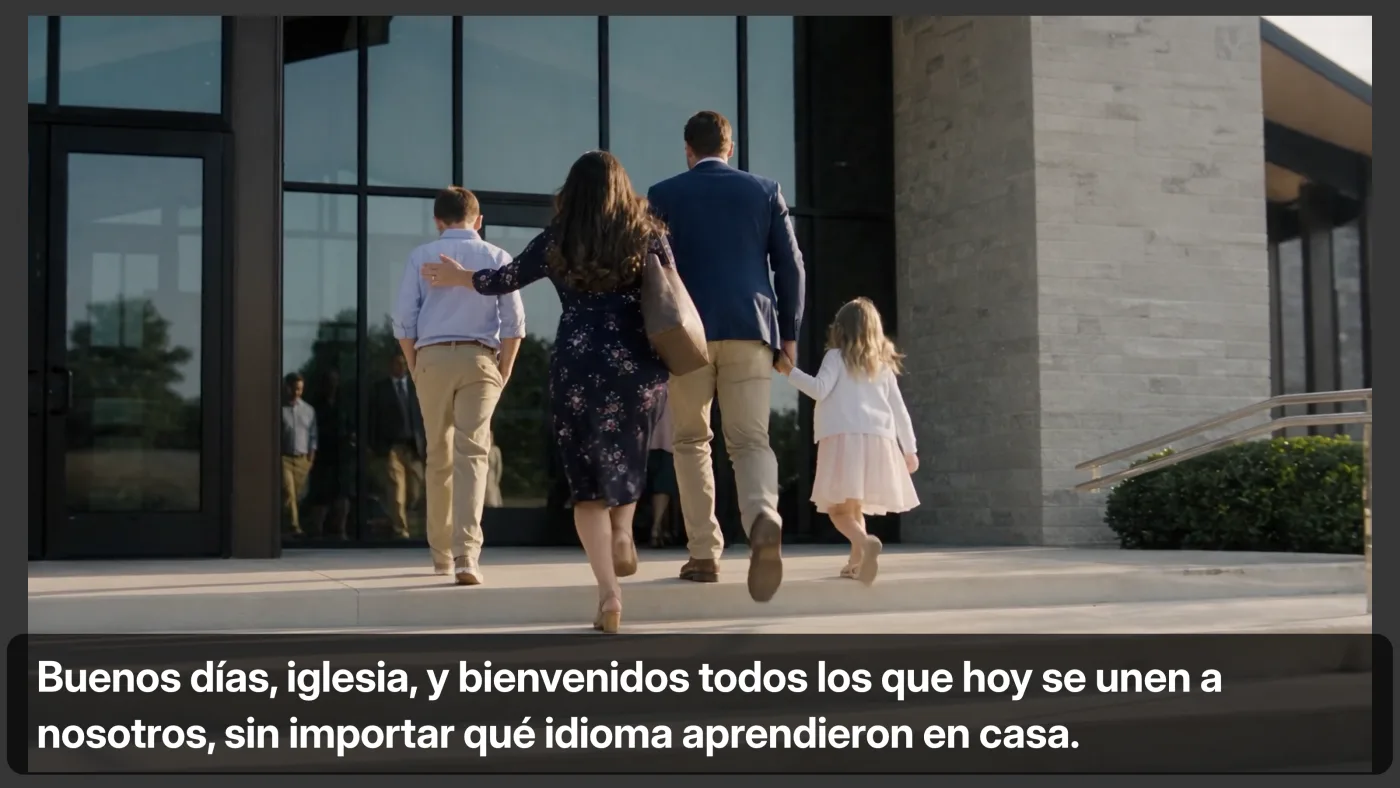
Put a video up like a slide and press Play. While it plays, Livefy translates the video’s own sound, with the captions over the picture.
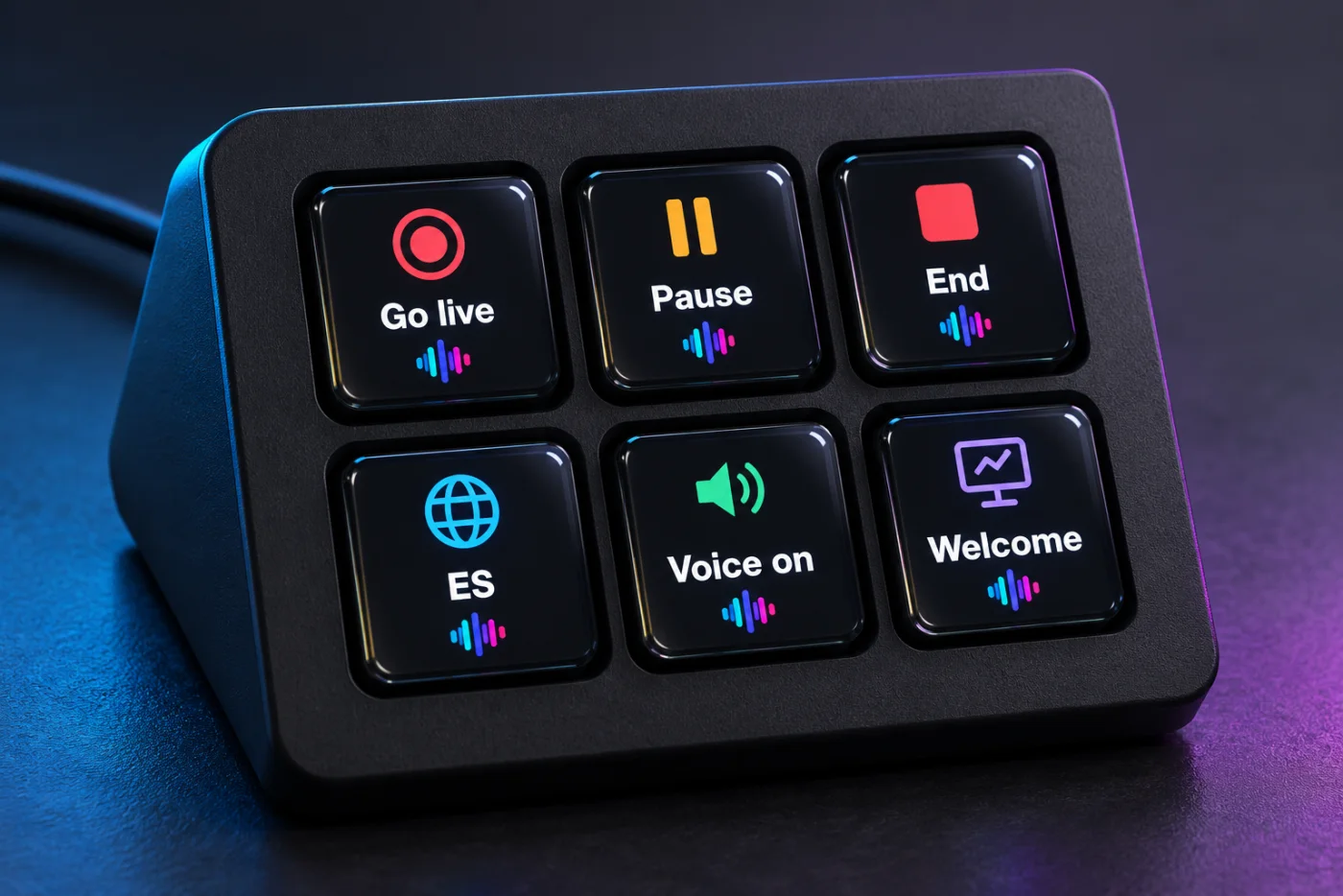
Go live, pause, end, switch the captions’ language, turn the phone voice on or off and show the welcome card, without leaving the board. Bitfocus Companion works too.
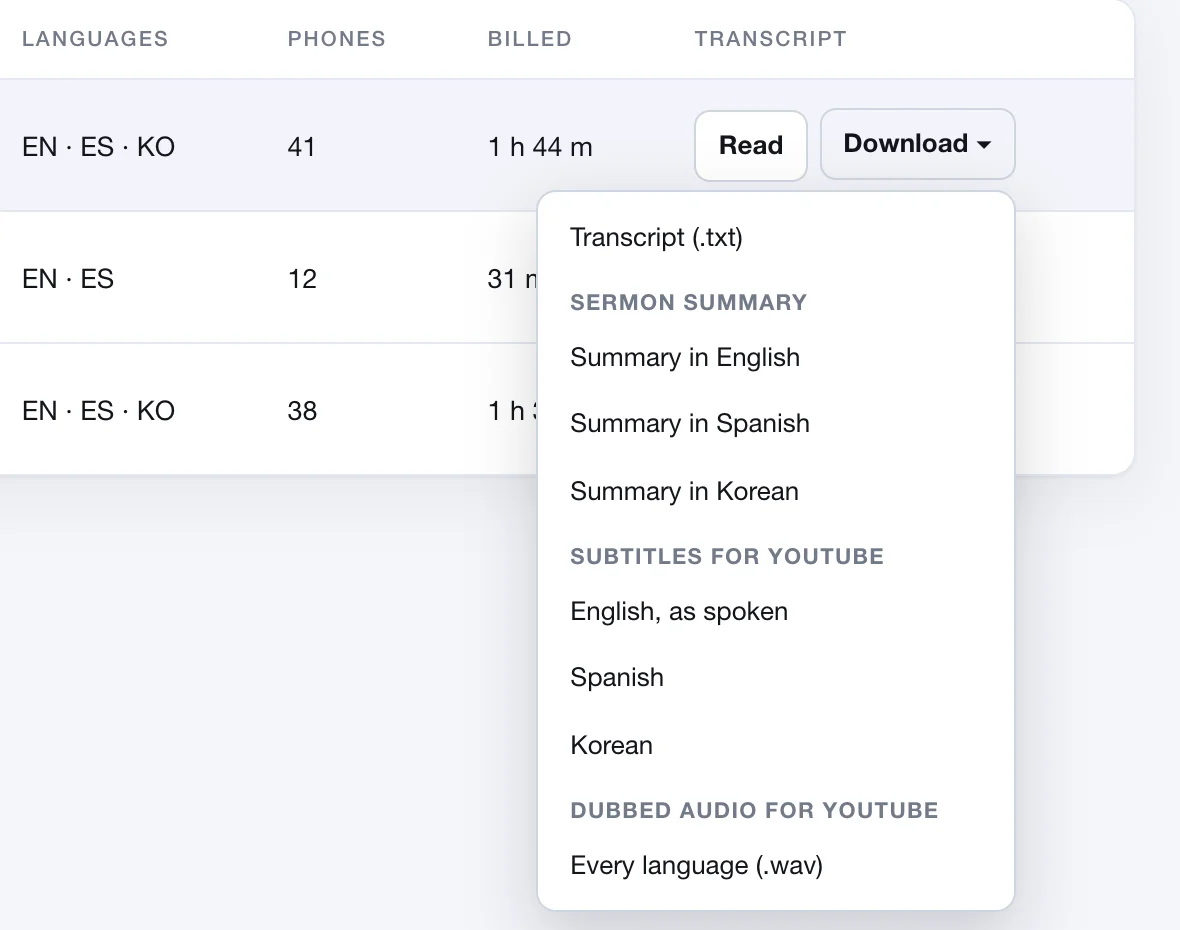
After the service, download subtitles in each language, or dubbed audio: the sermon read aloud over your own recording, in most languages that have a voice, ready for YouTube Studio.
Pictures from a made-up church. The slide and the video were made for them; the captions are Livefy’s own translation.
Pricing
Start with the free hours, then pick a plan. Hours you do not use roll over, month after month, as long as you have the plan. Upgrade or cancel anytime.
One hour of preaching into three languages costs $5,417 in interpreters, booths and receivers, at published 2025 rates. Here it is three hours off your plan. See the arithmetic
Find your plan
Church Plus fits 2 services a week in two languages.
About 13 translation hours a month. Counting a service as 45 minutes of translation.
For a closer count, estimate your month.
Weekly services, in as many languages as you need, each using its own hours.
Just $1.48 a day
Billed monthly · cancel anytime
10 translation hours each month
Unused hours roll over while you have the plan
About 3 services a week in one language, or
1 service a week in three languages
Every feature listed below
Start my free trialFirst 4 hours free · No credit card
More hours, for more services a week or more languages.
Just $2.93 a day
Billed monthly · cancel anytime
20 translation hours each month
Unused hours roll over while you have the plan
About 6 services a week in one language, or
2 services a week in three languages
Everything in Church, plus: two services at once on separate computers, priority support
Start my free trialFirst 4 hours free · No credit card
Large churches, networks, several campuses.
Just $5.56 a day
Billed monthly · cancel anytime
50 translation hours each month
Unused hours roll over while you have the plan
About 15 services a week in one language, or
5 services a week in three languages
Everything in Church Plus, plus: a named contact for your team
Start my free trialFirst 4 hours free · No credit card
Every plan
Counting a service as 45 minutes of translation.
Not right for your church? Ask within 30 days of a payment and we refund the hours of it you have not used, once per church. How refunds work.
Need more than 50 hours a month, or extra hours for a busy month? See all plans and hour packs.
Every plan runs as many languages as you need, at the same time, each using its own hours. A 90-minute service in three languages uses the hours three times over, once for each language. Hours count the time Livefy hears someone speaking, not the time on air, so silence adds nothing. Words sung in a song count if Livefy recognizes them: press Pause during songs to leave them out. During the free trial, hours count time on air, less pauses.
What Livefy does beside Synai, Glossa, Kaleo and wetranslate, from each one’s own pages as published on 17 October 2026.
| Livefy | Synai | Glossa | Kaleo | wetranslate | |
|---|---|---|---|---|---|
| Upload slides (PDF or pictures) to show with the translation, no presentation software needed | A PDF or pictures on the screens, with the translation beside or over them, from the console | Partly: captions over ProPresenter or FreeShow slides. No slide upload for the service screens source | Partly: captions on ProPresenter slides (a web element) or Proclaim slides (through OBS). No slide upload source | Partly: captions into ProPresenter through its Kaleo Connect Mac app. No slide upload found source | Not found on their pages |
| Unused hours | Unused hours roll over while you have the plan. Bought hours never expire | “Unused hours do not roll over.” source | Not found on their pages | Not found on their pages | “Unused minutes do not roll over to the next period” source |
| Translated voice for guests | In every plan: guests hear it in the phone’s browser, with no app | Standard AI voice included. Premium and cloned voices on request source | Yes, every plan. Voice cloning on the $299 and $499 plans source | Yes, in its mobile app only source | Only on the $169 plan, 5 hours, through the venue’s sound system source |
All 15 church translation apps compared. Product names are trademarks of their owners. Livefy is not affiliated with any of them, and none has reviewed or endorsed this page.
A RECORD YOU CAN CHECK
A record you can check, not a bill you have to trust. Every service writes itself down: how long translation ran, which languages ran, how many phones followed along at the busiest moment, and what that came to.
| Date | Service | Translated | Languages | Phones | Billed |
|---|---|---|---|---|---|
| Sun, Sep 610:02 – 11:58 | Sunday 10:00 service | 48 m | ENESKO | 38 | 2 h 24 m48 m × 3 languages |
| Wed, Sep 919:04 – 20:11 | Wednesday prayer | 31 m | ENES | 12 | 1 h 2 m31 m × 2 languages |
| Sun, Sep 1310:00 – 12:04 | Sunday 10:00 service | 52 m | ENESKO | 41 | 2 h 36 m52 m × 3 languages |
| Billed for these three services | 6 h 2 m | ||||
Example figures, laid out like the History page in your console. Yours fills itself in as you go, and downloads as a spreadsheet.
EVERY LANGUAGE, EITHER DIRECTION
That is 7,020 language pairs, not a list of 109 languages. A service preached in Spanish can be read in Korean on the screen and heard in Portuguese on a phone. Neither end has to be English. 42 new languages are captions only for now, with no voice yet.
Spoken in English · Acts 2:4–6
They were all filled with the Holy Spirit and began to speak with other languages, as the Spirit gave them the ability to speak. Now there were dwelling in Jerusalem Jews, devout men, from every nation under the sky. When this sound was heard, the multitude came together and were bewildered, because everyone heard them speaking in his own language.
Toți erau plini de Duhul Sfânt, și au început să vorbească în alte limbi, după cum le dădea Duhul puterea să vorbească, iar în Ierusalim locuiau iudei, oameni evlavioși, din toate neamurile de sub cer. Când s-a auzit acest sunet, mulțimea s-a adunat și a rămas nedumerită, pentru că fiecare îi auzea vorbind în propria lui limbă.
Todos estaban llenos del Espíritu Santo, y comenzaron a hablar en otros idiomas, conforme el Espíritu les daba la capacidad de hablar; ahora bien, había judíos que vivían en Jerusalén, hombres devotos de todas las naciones bajo el cielo. Cuando se oyó este sonido, la multitud se reunió y quedó desconcertada, porque todos los oían hablar en su propio idioma.
그들은 모두 성령으로 충만해졌고, 그리고 다른 언어들로 말하기 시작했습니다 성령께서 그들에게 능력을 주신 대로 말하게 하셨습니다. 그때 예루살렘에는 유대인들이 거주하고 있었는데, 하늘 아래 모든 민족에서 온 경건한 사람들이었습니다. 이 소리가 들리자 무리가 함께 모여 어리둥절해졌습니다, 이는 모두가 자기 언어로 그들이 말하는 것을 들었기 때문입니다.
他们都被圣灵充满了,并开始用别的语言说话,正如圣灵赐给他们能力说各地的语言,那时住在耶路撒冷的有犹太人,虔诚的人,来自天下各国。当听见这声音时,众人聚集到一起,都感到困惑,因为每个人都听见他们用自己的语言说话。
Todos ficaram cheios do Espírito Santo, e começaram a falar em outras línguas, conforme o Espírito lhes dava capacidade para falar, e havia judeus morando em Jerusalém, homens devotos, de todas as nações debaixo do céu. Quando este som foi ouvido, a multidão se reuniu e ficou perplexa, porque todos os ouviam falar em sua própria língua.
Tất cả họ đều được đầy dẫy Đức Thánh Linh, và bắt đầu nói bằng những ngôn ngữ khác nhau, khi Đức Thánh Linh ban cho họ khả năng nói, bấy giờ có những người Do Thái đang cư trú tại Jerusalem, những người sùng đạo, đến từ mọi quốc gia dưới bầu trời. Khi âm thanh này được nghe thấy, đám đông tụ lại và bối rối, vì mọi người đều nghe họ nói bằng ngôn ngữ riêng của mình.
Все они исполнились Святого Духа, и начали говорить на других языках, как Дух давал им способность говорить, а в Иерусалиме тогда находились иудеи, благочестивые люди из всех народов под небом. Когда был услышан этот звук, множество людей собралось и пришло в замешательство, потому что каждый слышал, как они говорили на его родном языке.
كانوا جميعًا ممتلئين بالروح القدس، وبدأوا يتكلمون بلغات أخرى، إذ أعطاهم الروح القدرة أن يتكلموا، وكان يقيم في أورشليم يهودٌ، رجال أتقياء من كل أمة تحت السماء. عندما سُمع هذا الصوت، اجتمع الجمع واحتاروا، لأن كلّ واحد كان يسمعهم يتكلمون بلغته.
Ils furent tous remplis du Saint-Esprit, et se mirent à parler dans d’autres langues, selon que l’Esprit leur en donnait la capacité de parler, il y avait alors à Jérusalem des Juifs, des hommes pieux de toutes les nations sous le ciel. Quand on entendit ce son, la multitude se rassembla et fut déconcertée, parce que chacun les entendait parler dans sa propre langue.
Livefy’s real translation of Acts 2:4–6, read aloud in English, into Romanian.
Guides for the pairs churches ask about most
Sermon live translation for churches · Página en español · Church translation in all 109 languages
* Captions only for now, with no voice yet.
Not on the list. Email hello@livefy.live and ask: the engine adds languages faster than this page changes.
Check yours with the language checker.
Hear it on a phone
Guests who would rather listen press Listen on their own phone. Livefy reads the translation aloud in their language, and each word lights up as it is spoken.
Tap a language on the phone to hear Acts 2:4–6 in it, or press Listen. Tap again to stop.
Example: Livefy’s phone voice, the one every church starts with, reading Livefy’s own translation on the page your guests open. No sound until you tap.
Try the demo church on your own phone: a short sermon on a loop, in 8 languages
Toți erau plini de Duhul Sfânt,
NOT ONLY SUNDAYS
A single event needs no plan.
When the two families speak different languages, guests scan a card and read or hear the ceremony in their own.
Weddings and funeralsRelatives who came from far away can follow the eulogy, the readings and the prayers in their own language.
Weddings and funeralsTalk to a person
Pick a time, and we phone you or meet you on a video call. We show you how Livefy would work at your church, with your sound desk, your screens and your languages, and help you set up your first service.
A FEW HELPFUL ANSWERS
Plans start at $45 a month for 10 translation hours, or $39 a month paid yearly. A single event needs no plan: $40 for 5 hours. An hour is one hour of translation in one caption language, and Pause stops translation, for example during songs. Extra hours are $6 an hour on any Church plan, monthly or yearly, and $8 without one. The first 4 hours are free, with no card.
Every new account gets 4 translation hours free, with no credit card required; each language you show uses its own hours. The free hours are for your first 14 days.
Yes. Cancel from Manage billing in your account, with no phone calls and no retention scripts. Your plan stays active through the end of the period you already paid for. When that period ends, so do the plan's unused hours and any free hours (from the trial, a referral or a gift). Hours you bought stay, and so does the account, with its history and settings, so you can pick a plan or buy hours again whenever you need them. If you want money back as well, ask within 30 days of the payment: we refund the hours of it you have not used, once per church.
No. People scan the QR code on the screen, or open the link you share, and the captions and the translated voice open in their phone’s web browser. There is nothing to install and no account to make.
Yes. For a Mass in Spanish, set the spoken language to Spanish and choose the caption languages your people need, English or any other. For a service that moves between English and Spanish, set the spoken language to the one used most; Livefy still hears the other. If yours switches back and forth, try a few minutes of it first. The page for parishes covers the Mass in more detail.
109 live translated languages: English, Spanish, French, German, Italian, Portuguese, Romanian, Polish, Ukrainian, Russian, Hungarian, Greek, Turkish, Arabic, Hebrew, Hindi, Chinese, Japanese, Korean, Vietnamese, Tagalog, Swahili and more. 42 new languages are captions only for now, with no voice yet.
It does the work of all three. It is a church translation system run from the sound desk: the sermon is translated in real time, as the pastor speaks, which is what simultaneous interpretation does, without interpreters or booths, and with no translation devices such as receivers or headsets needed. Guests use it like a translation app, in the phone’s browser, with nothing to install. The words show as live captions, or subtitles, on the screens and phones, and a translated voice reads them aloud.
A laptop or desktop computer with a web browser (phones and tablets cannot run a service), the sermon’s sound reaching that computer (from your mixing board, or a microphone near the pulpit), and a screen for captions (projector, TV, second monitor, or your phones). Your existing AV setup almost certainly works as-is.
No. The service runs in a web browser on a laptop or desktop computer, connected to the sermon’s sound. Phones are for listening: anyone in the room can follow the captions and the voice on their own phone.
Yes. Livefy gives you an Overlay link with no background. It goes into a Browser source in OBS Studio, a Web Browser input in vMix, or a web object inside a ProPresenter prop, all tested on the real programs (OBS 32, vMix 29, ProPresenter 21.4), and into anything else that can show a web page over video.
The best translation, with the highest accuracy. Livefy is built for church: it is made to keep names and Scripture references right, it knows the Lord’s Supper is not dinner, and it translates whole thoughts, not word by word. For the clearest result, take the sound straight from the mixing board.
Almost as soon as the words are spoken, a word at a time, so the screen follows the preacher instead of waiting for the end of each sentence. The translated voice on phones comes a moment later, a phrase at a time.
For listening, often yes: the sermon, the readings, the announcements and the prayers, in as many languages as you need at once, every week. It does not talk back, so a conversation, a counseling session or a prayer line still needs a person. And like any interpreter it makes mistakes, so try it on a service of your own first.
No. Livefy never stores the sound of your services. Transcripts are kept unless you turn that off in Settings, and turning it off deletes the ones already kept, at once here and within 30 days from our backups. Livefy also keeps its own copy of the words for a year, to find and fix translation mistakes.
Another question? Write to hello@livefy.live.
FREE TRIAL
First 4 hours free, about 5 Sunday services in one language. No credit card.
We email you a link. Click it and your free hours are ready.
The setup guide walks you through it, and the equipment guide lists what you might need.
Captions on your screens, a voice on every phone.
